

Margo

Build decks like you build software.

Margo turns markdown, media, and a theme into polished presentations you can review, version, and ship from Git.

Markdown + Go. Your source stays portable. Your final result looks polished and professional.

Section

The What & Why of Margo

What is Margo?

A lightning fast Hugo-inspired presentation engine

The malleable slideware for the age of agents. Compiles pure Markdown into beautifully styled, highly scriptable slide decks.

Built for agents and humans

  • Write content in markdown
  • Build and share reusable themes in html and css
  • Decks are portable (git) repositories
  • Agentic out of the box: new decks come with agent instructons and skills
When you can vibe code whatever app comes to mind, you should be able to vibe code a slide deck
JJ
John Januszczak
Creator of Margo
Why Margo?

Presentation work belongs in the same workflow as the work it explains.

Most teams still rebuild context in a slide editor, then lose the review trail, reuse path, and source of truth.

The old loop

  • Copy content into a visual editor
  • Recreate layouts by hand
  • Share a file with unclear provenance

The Margo loop

  • Author in Markdown
  • Preview locally with margo serve
  • Build a versioned artifact

One source of truth: content, theme, assets, notes, and release history live together.

Built for real presentation work

The engine stays generic. Themes own the visual system.

That boundary keeps a deck author’s workflow simple while giving theme authors real control over layout, typography, assets, and reusable components.

For authors

  • One slide per bundle
  • Front matter for intent
  • Notes for the detailed story

For theme authors

  • HTML templates and CSS
  • Layouts, partials, shortcodes
  • Explicit, deck-local configuration
Install Margo

Be up and running in seconds

Install margo on MacOS, Windows, or Linux (Omarchy!):

Install using Go

Install the latest tagged version with Go:

go install github.com/jjanuszczak/margo/cmd/margo@latest

Install via Homebrew

MacOS and Linux users can also install through the personal Homebrew tap:

brew install jjanuszczak/margo/margo

For prebuilt binaries, download the archive for your platform from the GitHub Releases page and verify it with the published checksums.txt file.

Section

What Margo gives you

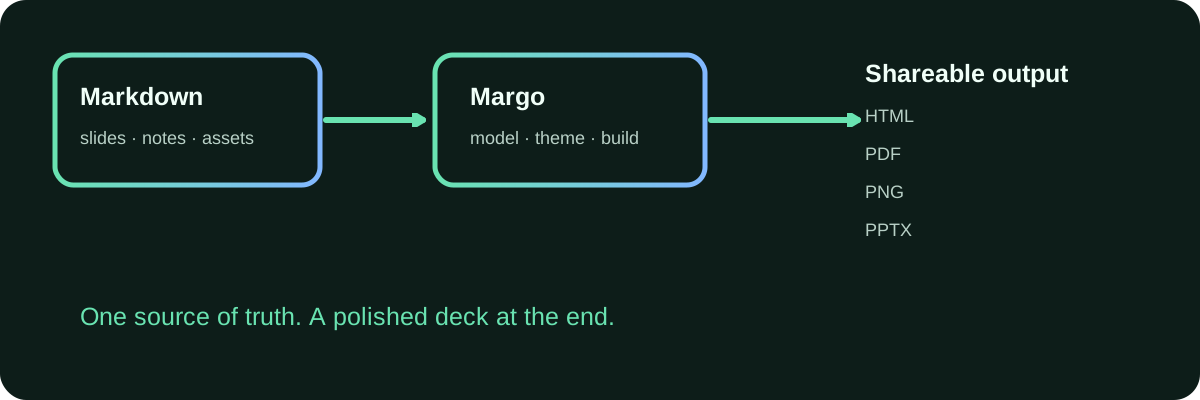
The authoring loop

From a folder of Markdown to a deck people can use.

Margo authoring flow

margo new starts the project. Slides live in bundles. margo serve keeps the review loop tight. margo build generates shareable formats.

Section

The workflow

A small deliberate CLI

Start fast. Keep the project readable.

Create and maintain

# new deck
margo new roadmap

# new slide
margo new slide launch-plan

# review managed guidance updates
margo upgrade --plan

# install the global brand-theme workflow
margo skills install brand-theme --scope user

Use archetypes when a slide needs a known content template. Review a safe scaffold update before applying it.

Preview and share

# preview with hot reloads
margo serve

# generate shareable formats
margo build

Preview as you write, then produce static output for a release, a review, or an archive.

Separate Content from Visuals

A practical system, not a slide editor in disguise.

Content development and theme development are separate but can happen in the same workflow.

Content model

  • YAML front matter
  • Slide bundles and local assets
  • Sections, drafts, hidden slides
  • Named speaker notes
  • Project-local includes

Rendering and delivery

  • Interactive HTML
  • Print-oriented HTML and PDF
  • PNG slides
  • Editable PPTX with clear limits
  • Vendored themes and portable archives
Publish versioned decks to GitHub Pages

Ship the same deck you reviewed.

Generate the workflow

margo deploy github-pages \
  --margo-version vX.Y.Z

Margo writes a transparent GitHub Actions workflow that pins the release version your deck passed review on.

Release or dispatch

git tag vX.Y.Z
git push origin vX.Y.Z

The workflow builds dist/html and deploys it on v* tags. You can also run it on demand from GitHub Actions.

Commit the generated workflow, then select GitHub Actions as the repository's Pages source. Margo configures the deck workflow, not your repository settings.

Section

Made for the age of agents

Give agents a real project

Give an agent a real project, not a browser tab full of hidden state.

Agents work from source, build it, and return a clear diff, not a reconstructed browser deck.

Source an agent can read

  • Markdown slide bundles and YAML front matter
  • Shared and slide-local assets with explicit paths
  • Named notes that retain the detailed context
  • Theme, configuration, and output choices live in the repo

Guidance travels with the deck

  • Skills cover authoring, themes, brand-theme creation, Pages, and triage
  • A portable deck archive includes its guidance
  • Safe upgrades preserve authored work and customized rules
Agent work that survives review

Let agents change the source, then prove the output.

Margo gives an agent a deterministic local loop instead of an opaque editor state. The result stays reviewable by people.

A scriptable loop

  • Create, build, serve, pack, and unpack from a local CLI
  • Keep theme and output configuration explicit in margo.yaml
  • Review a focused source diff instead of a reconstructed deck

Evidence before confidence

  • Triage assigns defects to the deck, theme, Margo, or environment
  • Brand themes require approved evidence and a component contract
  • HTML, PDF, and PPTX each need their own proof
Section

Theme System

Themes are portable visual systems

Everything visual lives in a theme.

Theme building blocks

  • Assets for CSS, fonts, JavaScript, and images
  • Layouts for deck and slide structure
  • Partials for reusable template fragments
  • Shortcodes for author-facing content components

Share and reuse

Keep a theme in a Git repository for maintained installs, or package one as a portable .margot archive for a fixed handoff.

margo theme add installs a theme. margo theme pack makes it easy to move between decks.

Shortcodes for content that needs specialized rendering

Write the source. Let the theme render the visual.

Math equations

i\hbar\frac{\partial}{\partial t}\Psi(\mathbf{r},t) = \hat{H}\Psi(\mathbf{r},t)

Flowcharts

flowchart LR
  A[Author writes Markdown] --> B{Needs a specialized visual?}
  B -->|Yes| C[Use a shortcode]
  B -->|No| D[Use Markdown]
  C --> E[Build the deck]
  D --> E
Shortcodes are reusable and theme-defined

When Markdown alone cannot express the visual.

{
  "data": {
    "datasets": [
      {
        "backgroundColor": "#69e3b1",
        "data": [
          24,
          33,
          28,
          37,
          31,
          26,
          35,
          30,
          39,
          34,
          42,
          36
        ],
        "label": "Core components",
        "order": 2,
        "stack": "components"
      },
      {
        "backgroundColor": "#82b8ff",
        "data": [
          8,
          5,
          11,
          7,
          13,
          9,
          6,
          12,
          8,
          14,
          10,
          7
        ],
        "label": "Deck-specific components",
        "order": 1,
        "stack": "components"
      },
      {
        "backgroundColor": "#f0fff8",
        "borderColor": "#f0fff8",
        "data": [
          31,
          75,
          111,
          163,
          204,
          239,
          288,
          328,
          383,
          430,
          491,
          541
        ],
        "label": "Cumulative deck adoption",
        "order": 0,
        "pointBackgroundColor": "#f0fff8",
        "pointRadius": 3,
        "tension": 0.3,
        "type": "line",
        "yAxisID": "y1"
      }
    ],
    "labels": [
      "Jan",
      "Feb",
      "Mar",
      "Apr",
      "May",
      "Jun",
      "Jul",
      "Aug",
      "Sep",
      "Oct",
      "Nov",
      "Dec"
    ]
  },
  "options": {
    "maintainAspectRatio": false,
    "plugins": {
      "legend": {
        "labels": {
          "color": "#f0fff8"
        },
        "position": "bottom"
      }
    },
    "responsive": true,
    "scales": {
      "x": {
        "grid": {
          "display": false
        },
        "stacked": true,
        "ticks": {
          "color": "#f0fff8"
        }
      },
      "y": {
        "beginAtZero": true,
        "grid": {
          "color": "rgba(240, 255, 248, 0.14)"
        },
        "stacked": true,
        "ticks": {
          "color": "#f0fff8"
        }
      },
      "y1": {
        "beginAtZero": true,
        "grid": {
          "drawOnChartArea": false
        },
        "position": "right",
        "ticks": {
          "color": "#f0fff8"
        }
      }
    }
  },
  "type": "bar"
}
{
  "data": {
    "datasets": [
      {
        "backgroundColor": "#69e3b1",
        "data": [
          24,
          33,
          28,
          37,
          31,
          26,
          35,
          30,
          39,
          34,
          42,
          36
        ],
        "label": "Core components",
        "order": 2,
        "stack": "components"
      },
      {
        "backgroundColor": "#82b8ff",
        "data": [
          8,
          5,
          11,
          7,
          13,
          9,
          6,
          12,
          8,
          14,
          10,
          7
        ],
        "label": "Deck-specific components",
        "order": 1,
        "stack": "components"
      },
      {
        "backgroundColor": "#f0fff8",
        "borderColor": "#f0fff8",
        "data": [
          31,
          75,
          111,
          163,
          204,
          239,
          288,
          328,
          383,
          430,
          491,
          541
        ],
        "label": "Cumulative deck adoption",
        "order": 0,
        "pointBackgroundColor": "#f0fff8",
        "pointRadius": 3,
        "tension": 0.3,
        "type": "line",
        "yAxisID": "y1"
      }
    ],
    "labels": [
      "Jan",
      "Feb",
      "Mar",
      "Apr",
      "May",
      "Jun",
      "Jul",
      "Aug",
      "Sep",
      "Oct",
      "Nov",
      "Dec"
    ]
  },
  "options": {
    "maintainAspectRatio": false,
    "plugins": {
      "legend": {
        "labels": {
          "color": "#f0fff8"
        },
        "position": "bottom"
      }
    },
    "responsive": true,
    "scales": {
      "x": {
        "grid": {
          "display": false
        },
        "stacked": true,
        "ticks": {
          "color": "#f0fff8"
        }
      },
      "y": {
        "beginAtZero": true,
        "grid": {
          "color": "rgba(240, 255, 248, 0.14)"
        },
        "stacked": true,
        "ticks": {
          "color": "#f0fff8"
        }
      },
      "y1": {
        "beginAtZero": true,
        "grid": {
          "drawOnChartArea": false
        },
        "position": "right",
        "ticks": {
          "color": "#f0fff8"
        }
      }
    }
  },
  "type": "bar"
}
Example monthly source activity and cumulative deck adoption
Section

How to Contribute

How to contribute

Make the right layer responsible for the job.

Contribute to the core margo repo for the engine. Make your own theme and deck repos.

Engine

Parsing, validation, asset resolution, staging, model shaping, and reusable template primitives belong in Go.

Theme and deck

Markup, class composition, visual hierarchy, and component presentation belong in templates and CSS.

Do not turn authoring into a second programming language. Prefer explicit conventions and small, useful extension points.

Create the deck. Keep the source. Ship the story.

Start with margo new, make the presentation yours, and send a focused contribution when the workflow needs to be stronger.

Learn More:

Official Repository

Authoring guide

Discuss & Contribute

Use left/right arrow keys